Showing posts with label USB Format. Show all posts

4 Interesting and Useful Things to do with your USB Pen Drive

If you're new here, you may want to subscribe to the RSS feed to receive more such tips and tricks. It's completely free! Thanks for visiting!
If you’ve got a USB Pen Drive, you can use it for a variety of things, that includes adding portable apps and lots more.
But, your Pen Drive can serve some interesting purposes as well - some you wouldn’t have imagined about. Put it to some good use, here’s a quick list of what you can do with it:


1. Install a Linux Distro
Pen Drive Linux guides you through procedures on loading your USB Drive with a Linux Distro. If you’re a geek, you’ll love this setup. If you’re just a normal user, this may come to your use in a variety of situations - you go to a friend’s computer, which is infected with pesky viruses. You need not worry, boot with your Linux-loaded pen drive and do your job, safe and secure.


2. Install MojoPac
I usually don’t recommend software that you’ll have to pay for using, but this one is something I can’t resist myself from recommending to you dear readers. Yes, this is a wonderful app that’ll install itself into a pen drive, and run on top of Windows. You can run your favourite Windows apps, most of them run perfect on this MojoPac layer. The advantage is that none of the modified settings affect the original Windows over which your MojoPac is running on. Quite cool, isn’t it?


3. Automatic Backups
You’re probably using your USB Pen Drive as a backup device to hold your important documents, but why not make the process easier? Install Allway Sync or Microsoft SyncToy. Both can let you sync files on your computer with your USB Pen Drive with ease. You don’t have to do manual copy & paste files - just insert, click and you’re done.


4. Additional Memory


Vista can use your USB Flash Drive just like your RAM - such a capability is integrated into the OS. Windows XP just can’t use it as additional memory - your flash drive is just a flash drive. Not anymore if you have eBoostr installed. This software program aids XP in using your Flash Drive as a memory device. You might want to give this a try if your computer is hungry on resources and needs some speed boost.
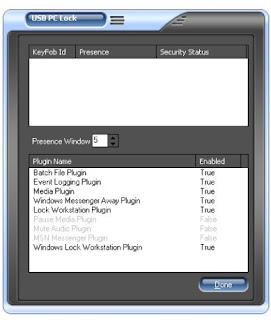
Lock Your Computer With USB Flash Drive

Most of us are using USB drives these days, coz they are so helpful to carry our data with us. But now you can also Lock your computer with your USB drive. USB PC Lock Pro Turns any USB Flash Drive into a key that prevents unauthorized people from using your computer. USB PC Lock will automatically lock your computer and perform other actions when you step away from it.
Features:


1. Lock worksation when you step away.2. Lock MSN Messenger.3. Stop streaming media traffic.4. Mute audio.5. Start/Stop event logger.6. Start/Stop batch.
USB PC Lock Pro is completely free and for Windows only. It needs to be installed on the computer that you want to use it on, and not on the USB drive itself.

Back up your data from a virus infected pen drive

Trouble:

We have been receiving lots of problems these days, most of the problems relate to different types of virus which commonly infect through pen drives. There are large number of viruses like NewFolder.exe virus, Funny UST Scandal avi.Exe , kinza.exe and W32.Rontokbro.B@mm virus.

Most of these viruses cause the following most common problems on your windows computer.
Folder Options Hidden
Task Manager Disabled
Registry Editing Disabled
Command Prompt Disabled
All the types of viruses which infect from your system, through a file called autorun.inf created on the root directory of your pen drive. So, when you double click your virus infected pen drive the virus automatically copy itself to your system.

Let’s see how can you still open your infected pen drives on your computer copy your data.

Fix:
1. Firstly insert your pen drive into the USB port, windows will run autorun menu but don’t open your pen drive through autorun menu rather cancel it.
2. As your pen drive will get detected and will show under My Computer with a drive letter associated.
3. Press Window + D and type : and press Enter.
For Example
e:
4. Back up your files from your pen drive, but remember to copy files only not folders
5. Now, Click on Tools >> Folder Options and Click the View tab.
Scroll down and select to show hidden files and folders and click Ok
6. Move back the focus to your pen drive, you will many virus files and folder and delete any files or folder which looks suspicious to you from your pen drive.

Solutions to Top 10 USB Pen Drive Problems

Trouble:
Let me ask you a question
Are you facing any problem with your USB pen drive ?

If the answer is yes, the you are not alone. There are millions of users of USB drives or pen drives in the world today and it has become one of the most used data storage device.

Over the past few months we have written about a lots of troubles of USB Pen drives and their solutions. Let us summarize top 10 useful posts for your quick reference.

Top 10 USB drive / pen drive related problems and fixes:

Lets see a short summary of each problem and the fix:
Fix:
Computer Does Not Detect Pen Drive or USB Drive or i-pod : This kind of problem is faced due to some bad registry settings. After you fix up the registry, the USB drive will work fine. To fix this issue, see this post.
Pen Drive or USB Mass storage device disabled at office or college or school: At many offices and colleges, the IT people disable or block the use of pen drives. To enable the USB drive when it is blocked, see this post.
Problem in removing pen drive: When you try to remove the pen drive via safely remove hardware option, it gives error “Generic volume can not be stopped right now”. It may damage your pen drive if it is removed without stopping it properly. To fix this error, read this post.
Protect computer from virus in pen drive: Many of the deadly viruses spread easily through use of pen drive. To see the safety tips on how to protect the computer from virus infection by pen drive, see this post.
USB drive is detected, but not shown in My Computer: This kind of problem is also seen in cases of conflict over drive letter assignment by windows. The drive is there and detected but without a valid drive letter assigned to it. See the fix to this problem here.
Problem in formatting pen drive: Sometimes when you try to format the pen drive, you might see an error which says “Can not format the drive”. There can be several reasons for this. To fix this problem, see this post.
USB Device has Malfunctioned: This one of the unusual warnings which you get sometimes, the solutions to this problems sounds silly, but it works, see the solution here.
Delayed Write failed error: This is another kind of error which is more common with USB hard drives due to some error in File allocation table. This problem can be fixed by following few simple steps. See the fix here.
Disable data writing on pen drive: This is one of the articles which tells you how you can stop data writing on your pen drive on a particular computer. This will save the drive from getting virus infections. See the post here.
Fixed SATA Drive shown in removable USB drive list: This problem we have recently seen for many users. This is a kind for feature in a certain RAID configuration, but annoys many users. See the fix for this trouble here.
We hope you liked the above posts, if you want more updates on such useful posts Subscribe via e-mail for Free.!

C drive shown in safely remove USB Mass Storage Device list

Trouble:
Is your fixed SATA drive or C drive shown in tray in the list of Safely remove USB Mass storage device in Windows ? For many of our readers using Nvidia motherboard the answer is yes !

We have received many mails from our readers regarding this problem. This kind of problem is seen after a windows updated few weeks back which had updated for optional Nvidia drivers. After this driver update many users have seen the fixed SATA drive as removable drive.

Why is my SATA drive in list of removable drives?
Nvidia motherboards / chip-sets driver software has been enhanced to support some enhanced RAID technologies. Thus as a feature of it, the drives interprets all the SATA drives as hot-swappable drive. That is why you see fixed SATA drive in removable media list.

Lets see how you can fix this issue.
Fix:
Before we talk of the fix, the important question is:
How dangerous is it to have your fixed drive in removable drives?
Well truly speaking, not very dangerous, because when you try to remove a drive which has windows installed on it, the windows will show an error saying that "The Device Generic volume cannot be stopped right now" . This means that the media will not be released as it is in use by windows. So even if you accidentally click on Safely remove C:, the windows will not let you do that, thus there is no harm.

How to fix this issue?
The simplest fix is to revert the Nvidia Driver recently installed on the computer with the windows update. You can also do a system restore to a previous date when this problem was not there.

Even if you are not able to remove it successfully from the removable list, you can safely live with it there no problem being a removable drive.

C drive shown in safely remove USB Mass Storage Device list

Trouble:
Is your fixed SATA drive or C drive shown in tray in the list of Safely remove USB Mass storage device in Windows ? For many of our readers using Nvidia motherboard the answer is yes !

We have received many mails from our readers regarding this problem. This kind of problem is seen after a windows updated few weeks back which had updated for optional Nvidia drivers. After this driver update many users have seen the fixed SATA drive as removable drive.

Why is my SATA drive in list of removable drives?
Nvidia motherboards / chip-sets driver software has been enhanced to support some enhanced RAID technologies. Thus as a feature of it, the drives interprets all the SATA drives as hot-swappable drive. That is why you see fixed SATA drive in removable media list.

Lets see how you can fix this issue.
Fix:
Before we talk of the fix, the important question is:
How dangerous is it to have your fixed drive in removable drives?
Well truly speaking, not very dangerous, because when you try to remove a drive which has windows installed on it, the windows will show an error saying that "The Device Generic volume cannot be stopped right now" . This means that the media will not be released as it is in use by windows. So even if you accidentally click on Safely remove C:, the windows will not let you do that, thus there is no harm.

How to fix this issue?
The simplest fix is to revert the Nvidia Driver recently installed on the computer with the windows update. You can also do a system restore to a previous date when this problem was not there.

Even if you are not able to remove it successfully from the removable list, you can safely live with it there no problem being a removable drive.

format USB drive with NTFS

How to format USB drive with NTFS
(copy and paste following link in your address bar)

link:http://tinyurl.com/2vfa5w